
Practical technical support
PHP security patches: versions, backports and running services
Learn why a PHP banner cannot prove patch status, how to identify a full vendor package revision and how to interpret a scoped advisory result.
Last reviewed:
Why an old-looking version can contain a new fix
A Linux distribution can take a security fix and apply it to the PHP version it maintains, rather than replacing it with the latest upstream feature release. This is a backport. The visible PHP version may remain the same while the distribution’s package revision changes.
That means a public banner such as PHP/7.4.3 is insufficient evidence for a patch verdict. Conversely, an ESM or vendor suffix alone does not establish that a particular fix is included. The exact operating-system release, package source and full revision all matter.
Upstream support and vendor maintenance are also distinct questions. A distribution’s supported backport can address a named issue without making an old PHP branch a good long-term application platform. Keep a migration plan alongside routine security patching.
Gather the right four pieces of information
- Distribution and release: the OS inside the actual server or container running PHP.
- Web PHP runtime: the version and handler serving the website, not merely command-line PHP.
- Full installed package revision: including epochs, packaging suffixes and extended-maintenance revision.
- Package source: official distribution repository, hosting-provider build or another supplier.
A host’s PHP selector may show only the runtime version. Ask the provider for the complete package revision and its advisory when that is missing. Do not pick a similar-looking Ubuntu package for a custom build or Remi stream; matching rules and maintenance responsibility belong to the actual supplier.
Use the owner-supplied check
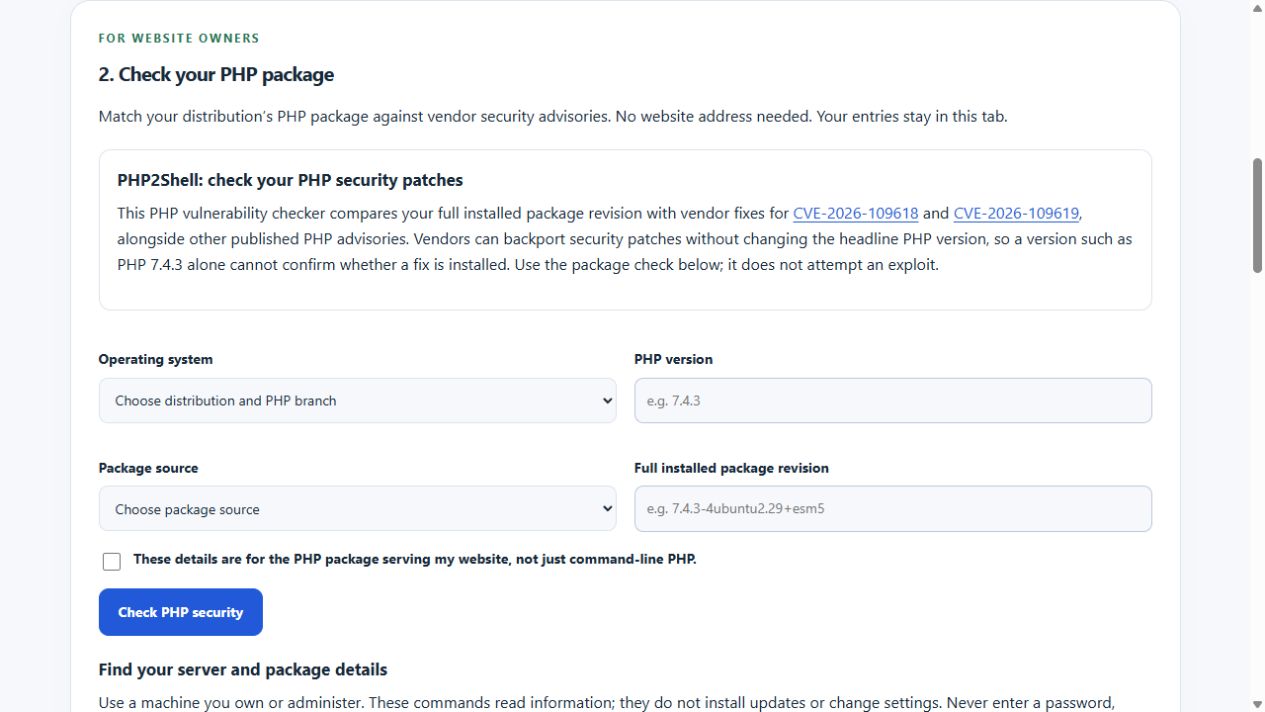
The PHP package assessment compares entered details with the explicitly covered vendor combinations. Its expandable instructions include read-only commands for Ubuntu, Debian, AlmaLinux and Rocky Linux. Inputs remain in the browser; it downloads a shared advisory snapshot rather than sending your package inventory to a scanner.
Confirm that the package serves the website before ticking the runtime checkbox. Command-line PHP and PHP-FPM can differ, and several PHP versions may be installed. A container’s packages can differ from those on its host. An inconclusive result is preferable to a precise-looking answer about the wrong runtime.
A real backport example: PHP2Shell
Canonical’s published records for CVE-2026-109618 and CVE-2026-109619 identify 7.4.3-4ubuntu2.29+esm5 as a fixed Ubuntu 20.04 PHP 7.4 revision. The headline PHP version is still 7.4.3. This is a vendor-specific example, checked on the review date above, not a universal package to install on another distribution.
The checker can distinguish that revision from the earlier 7.4.3-4ubuntu2.29+esm4. It considers other retrieved PHP advisories as well as the PHP2Shell pair. Recognising those two fixes must not turn into a claim that every issue on the server is resolved.
Use the current vendor advisory and normal package source when deciding an update. Ubuntu Pro or other extended-maintenance packages also require the relevant access and support entitlement. A revision copied from an example is not evidence that it is installed on your machine.
Understand the possible outcomes
| Result | Meaning | Next step |
|---|---|---|
| Affected package version identified | A covered record places the supplied revision in an affected range with a published fix. | Review that vendor record and update through the normal approved source. |
| Vendor fix identified | The supplied published package revision matches the covered fix comparison. | Confirm the running service has loaded the updated package. |
| Some advisories still need review | Other records have unresolved applicability, no listed fix or remaining uncertainty. | Read those advisories; do not call the whole machine secure. |
| Unable to determine | Coverage, source, revision, runtime confirmation or freshness is insufficient. | Ask the supplier for evidence rather than treating no conclusion as no vulnerability. |
Installed and running are different states
Updating a package on disk does not itself prove that every long-running service has restarted onto the new code. Follow the vendor’s service-restart and verification instructions, using a maintenance window where appropriate. Include workers and containers in the check rather than only a shell’s PHP command.
If there is reason to suspect compromise, a patched version is not a clean bill of health. Investigate the incident, logs, credentials and recovery separately. This tool does not test an exploit, inspect application code or audit WordPress plugins.
Check evidence and freshness
Read the result’s source links and last successful refresh time. Vendor publication and feed-import delays are possible. WAIU refuses a positive package conclusion when its snapshot is more than 12 hours old. Its live refresh job must be enabled and functioning for that shared data to remain current.
Keep the comparison in a maintenance record: supplied package, relevant CVEs, fixed revision, advisory date and what the administrator verified afterwards. That gives you a useful trail without mistaking a public website header check for a server security audit.